
Table of Contents
Dressing up your virtual avatar on Zenkai Online is an exciting way to showcase your style and creativity! 🎨✨ Here’s a step-by-step guide to help you get started:
1. Log in to Your Account 🔑 #
- Go to Zenkai Online and log in with your username and password.
- If you’re new, create an account and set up your basic avatar.
Switch Between Profile Picture and Virtual Avatar 🔄 #
- If you’d like to toggle between using a regular profile picture or your Zenkai Virtual Avatar:
- Click the cogwheel ⚙️ icon in the header to access your settings.
- Go to the Profile Info section.
- Scroll down until you find the option labeled “Use Virtual Avatar”.
- Toggle this option on or off, depending on your preference.

2. Navigate to the Avatar Customization Page 🧑🎨 #

- Once logged in, click on your profile picture or username to access your dashboard.
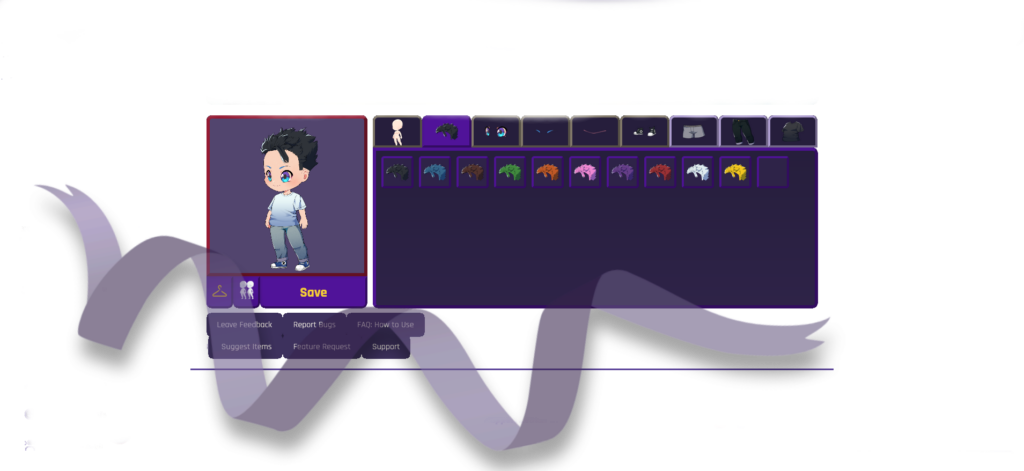
- Look for the “Customize Avatar” or look for icon of the avatar.
3. Browse Available Items 🛍️ #
- Explore the available options for customization, such as:
- Clothing 👕👖: Tops, bottoms, dresses, and outerwear.
- Accessories 🎩👓💍: Hats, glasses, bags, and jewelry.
- Hairstyles 💇♀️💇♂️: Different cuts, colors, and styles.
- Skins and Themes 🎨: Unique designs to change the overall look of your avatar.
- Some items may be free, while others might require Zenkai Gems or event rewards.
4. Mix and Match Your Style 👗 #
- Select items by clicking on them. You can preview how each piece looks on your avatar in real time.
- Combine different clothing and accessories to create your desired look.
- Use filters or categories (e.g., casual, fantasy, anime) to narrow down your choices.
5. Adjust and Finalize ✨ #
- Use the customization tools to:
- Change the color of clothing or accessories (if supported) 🎨.
- Adjust the size or position of certain items to fit perfectly 🧵.
- Rotate/flip your avatar to see how it looks from all angles 🔄.
6. Save Your Avatar 💾 #
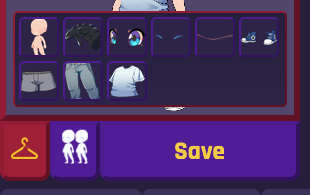
- Once satisfied, click Save or Apply Changes to update your avatar.
- Your updated avatar will appear on your profile, in forums, and in other interactive areas of Zenkai Online.
7. Unlock More Options 🎁 #
- Shop for New Items 🛒: Visit the in-game shop to buy exclusive outfits or rare items.
- Participate in Events 🗓️: Earn limited-edition pieces by joining seasonal or special events.
- Earn Zenkai Gems 💰: Complete challenges or engage with the community to earn currency for more customization options.
Tips for a Unique Avatar 💡 #
- Experiment with layering accessories to create a one-of-a-kind look.
- Use themed sets to match seasonal or event vibes.
- Stay updated with new releases by following Zenkai Online announcements.
Now you’re ready to stand out in the Zenkai Online community! Enjoy customizing your avatar and let your creativity shine! 🌟


